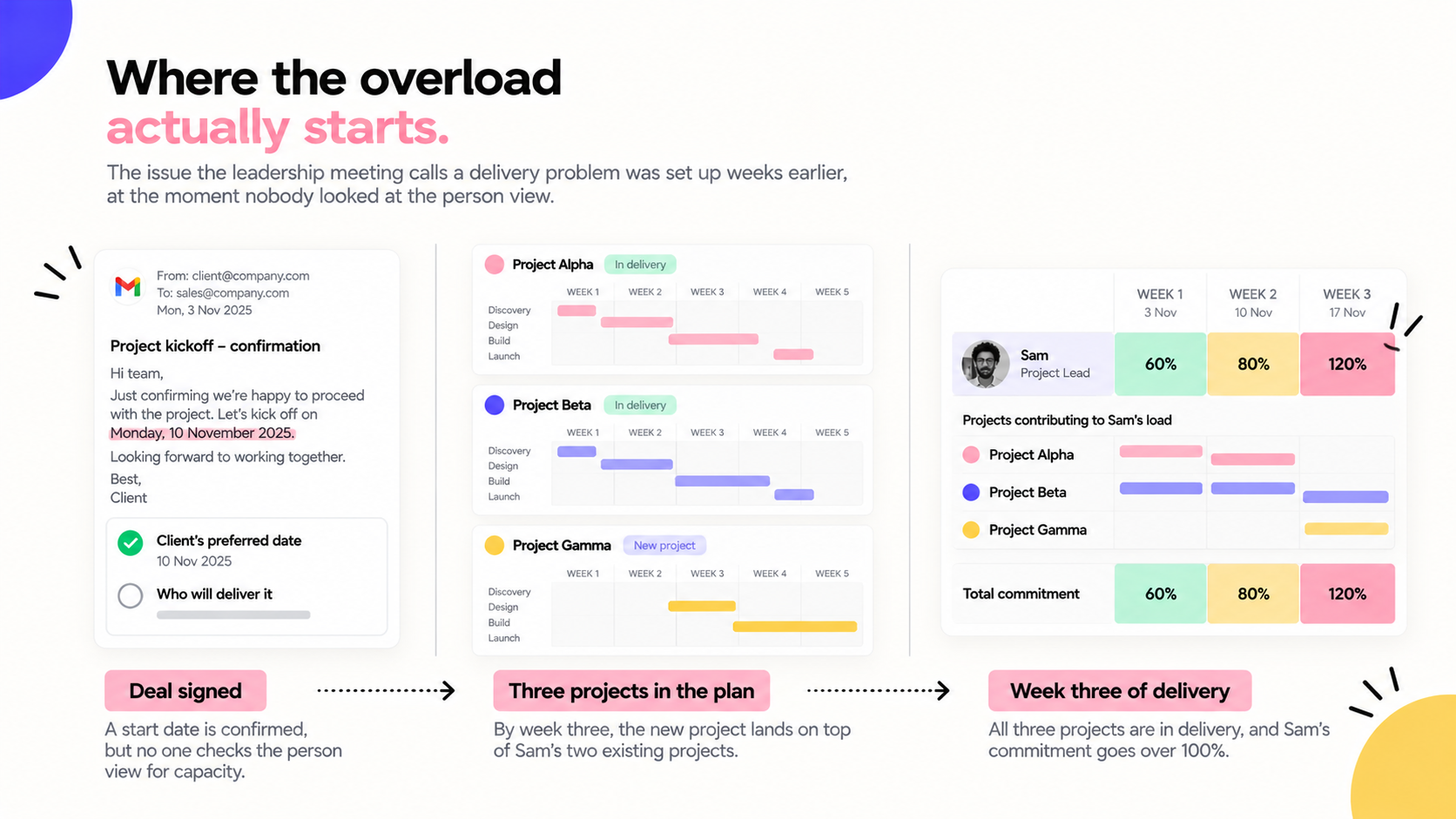
Three project managers are planning their next few weeks of work. Each has a realistic timeline, clear deadlines and someone responsible for every task.
They've also each allocated Sam, a senior team member, around 20 hours a week.
Individually, the plans look perfectly reasonable. But when all three projects reach their busiest periods, Sam is suddenly allocated 60 hours of work in one week.
Nobody spotted the problem because each project manager was looking at their own project.
When good project plans create an impossible workloadAt first, everything runs smoothly. The projects started at different times, so Sam can manage the work.
By week three, all three projects are in full delivery. Sam starts working evenings to keep up, but eventually a deadline slips.
The project manager asks what happened. Sam explains that an urgent request from another client took longer than expected.
The project gets replanned, pushing its next milestone into an already busy period on a third project.
Soon, multiple deadlines are slipping, and leadership wants to know why the project managers aren't planning properly.
The individual project plans were reasonable, the problem was that nobody had checked whether Sam had enough time to deliver the work across all three.
Project planning and resource planning answer different questionsProject planning focuses on what needs to happen, who is responsible and when the work needs to be completed.
Resource planning looks at the people available across the business, how much work they're already committed to and whether they have capacity to take on more.
You need both.
We see businesses invest heavily in project management, with detailed timelines, Gantt charts and weekly status meetings, while paying far less attention to resource planning.
Sometimes the problem starts before delivery even gets involved.
Sales agrees to a start date because it works for the client. The deal gets signed, and only then does someone check whether the team is available.
If everyone is already fully booked, the business has to move existing deadlines, ask people to work longer hours or delay the new project.
It's a much harder conversation to have after you've already made a commitment.
Why better project management software isn't always the answerWhen deadlines start slipping, the natural response is to tighten up project management. More detailed plans, more reporting, perhaps even a new project management tool.
But better project planning won't help if nobody is looking at workloads across the business.
Tools like monday. com and Projectworks already offer resource planning capabilities. The difficulty is often in how businesses use them.
If tasks aren't assigned estimated hours, leave and internal commitments aren't accounted for, or nobody is reviewing workloads across projects, you still won't have a realistic view of capacity.
We've experienced this ourselves.
During an internal culture survey at mutherboard, capacity came back as the biggest concern raised by our team.
Rather than simply asking project managers to plan more carefully, we promoted someone internally into a dedicated resource planner role.
Their job is to understand where people are over or under capacity and help the business make better decisions about how work is allocated.
How to improve resource planningYou don't necessarily need new software to start. A spreadsheet or the tools you already use can work, provided someone takes responsibility for keeping the information accurate.
Here's where we'd begin.
- Work out people's actual availability.
Start with contracted hours and deduct regular meetings, admin and planned leave. Someone contracted for 37.5 hours who spends five hours on internal work has around 32 hours available for project delivery.
- Look at workloads across every project.
For each person, add up the hours allocated across all live projects for the next six weeks. This is how you spot someone like Sam being booked for 60 hours when they only have 32 available.
- Set capacity thresholds.
We use three bands with clients: under 75% committed is green, 75–90% is amber, and over 90% is red. We flag workloads above 90% because unexpected requests and delays are inevitable.
- Compare planned and actual hours.
Once a month, compare allocated hours with timesheets. If someone consistently works more hours than planned, investigate whether the work was underestimated or the data is incorrect.
- Give resource planning an owner.
Set aside 20 minutes each week to review who's over capacity in the next three weeks. Decide whether work needs to be reassigned, deadlines moved or new projects delayed.
- Check capacity before confirming new work.
Before sales agrees to a start date, check the availability of the people who will deliver it. Negotiating a realistic timeline upfront is far easier than explaining a delay later.
A realistic plan needs both viewsIf someone had looked at Sam's total workload before those three projects started, the 60-hour week would have been obvious.
The business could have adjusted deadlines or reassigned work before it became a delivery problem.
That's what good resource planning gives you: the ability to make those decisions while you still have options.
At mutherboard, we help businesses connect project planning, resource scheduling and time-tracking information so they can understand workloads across their teams and plan more realistically.